 indiely
Store Page · FIELD NOTES
Press Quotes and Awards on Your Steam Page: Where They Go and the Rules
Where press quotes and awards can and cannot go on a Steam store page, Valve rules for each section and how to choose the quotes and awards worth showing.
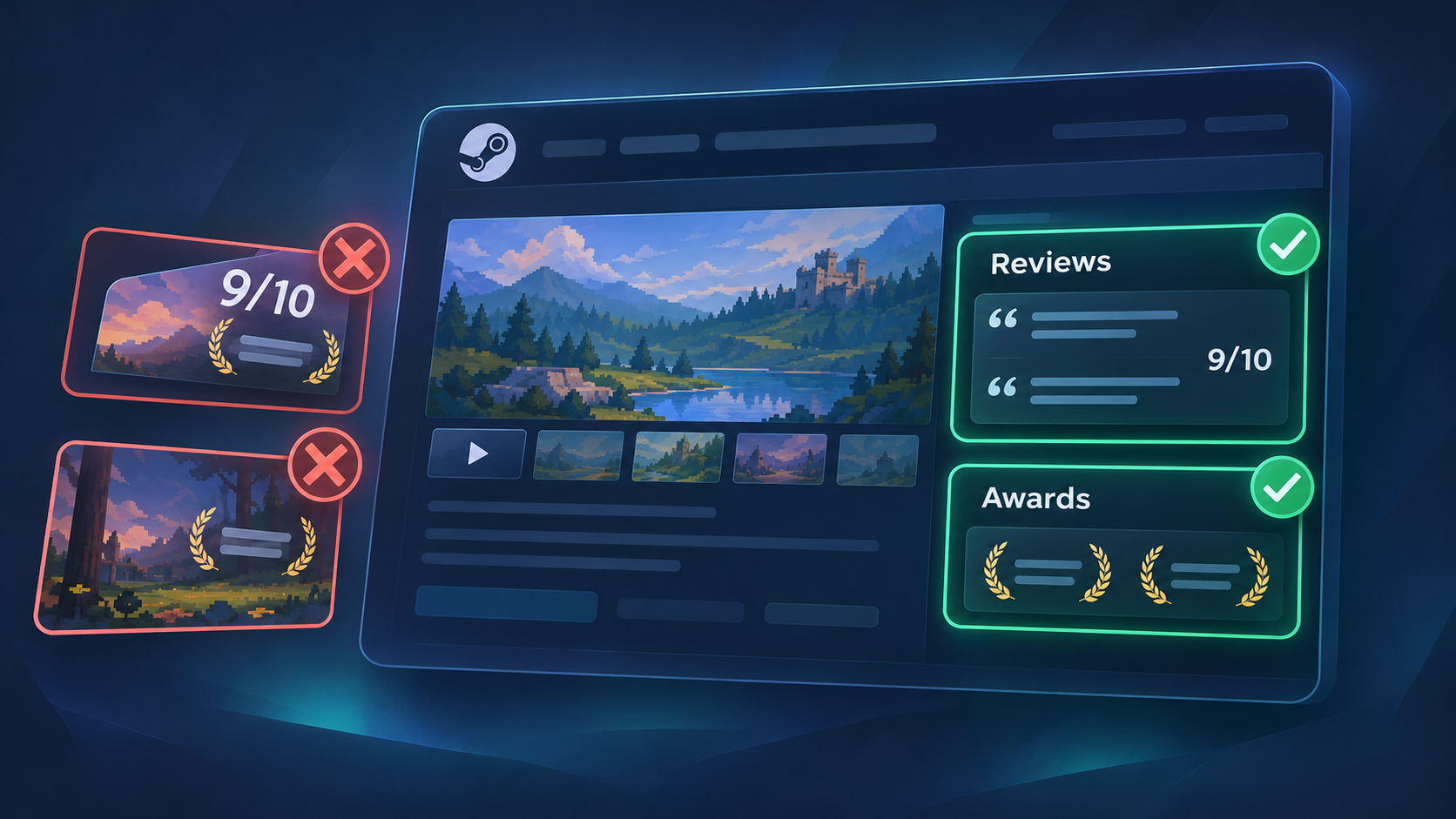
A short quote from a respected outlet or a festival award can help a hesitant visitor trust an unknown indie game. But Steam has specific places for press quotes and awards, and specific places where they're not allowed. Putting a "9/10" on your capsule or an award logo in your screenshots can get your store page rejected or limit your visibility.
This guide explains where press quotes and awards go on a Steam store page, Valve's rules for each, and how to choose the ones worth showing.
Where press quotes and awards can (and can't) go
| Place | Press quotes and awards allowed? | Source |
|---|---|---|
| Reviews section (Description tab) | Yes: this is the dedicated place for press quotes | Valve: Reviews and awards |
| Awards section (Description tab) | Yes: this is the dedicated place for awards | Valve: Reviews and awards |
| Base capsule art | No review scores, award names, symbols or logos | Valve: Graphical asset rules |
| Screenshots | No images showing awards or marketing copy | Valve: Store graphical assets |
| Trailers | Valve's "General / Cinematic" category explicitly includes accolades | Valve: Trailers |
Adding press quotes (the Reviews section)
You add press quotes from the Description tab of the store page editor. According to Valve, each review has:
- The organization's name
- A URL linking to the review
- An approved marketing quote
- The language of the quote
- An optional review score ("you can leave this blank if you want")
Press quotes appear below your events and announcements, and above "About This Game", which puts them right where interested visitors start reading. Valve's rules are short:
- Keep quotes short: "Ideally 1 or 2 short sentences."
- Be accurate and get permission: "Reviews should be accurate and you should have permission to post them."
- Localize where you can: quotes can be added in other languages.
Adding awards (the Awards section)
Awards are added from the same Description tab, and appear on the right-hand side of your store page, below the Share and Embed section. Valve's guidance:
- Text or images: awards can include text or images, formatted with BBCode, like your description.
- Keep it short: "Usually 1-5 awards is enough. Any more makes it confusing for users."
- Collapsed by default: players have to expand the section, so put your most important award first.
- Accuracy: "Awards should be accurate."
- Localization: "Awards should be localized where possible."
Which quotes and awards are worth showing?
Valve says both sections are optional, and some developers find them useful. These are our recommendations for choosing what goes in:
- Specific beats generic. "The best pixel-art fishing game I've played" says more than "Amazing!". A quote that describes what makes your game special works like a second short description.
- Relevant outlets beat big names. A quote from a respected site in your genre often persuades your audience more than a passing mention from a general outlet.
- Festival selections count. Official selections and showcase appearances are legitimate accolades. Name the event and year clearly.
- Fewer, stronger items. Two great quotes and two real awards look more credible than eight weak ones.
- Keep them current. Replace pre-release preview quotes with review quotes after launch.
How to collect press quotes before launch
- Send your game to the right people. Use Curator Connect for Steam Curators and verified keys for press and creators. See our guide to Steam keys and Curator Connect.
- Make coverage easy with a press kit that has your trailer, screenshots, logo and key facts.
- Enter festivals and showcases that fit your genre, for selections and awards.
- Ask permission before using a quote, and agree on the exact wording.
- Keep a simple log of quotes, links, dates and permissions, so you can update your page quickly.
Common mistakes
- Review scores or laurels on the capsule. Not allowed on base capsules, and it can limit visibility.
- Award logos burned into screenshots. Screenshots should show gameplay only.
- Quotes without permission, or edited so they change the meaning.
- Too many awards. Valve says more than about five gets confusing.
- Long quotes. Trim to one or two short sentences.
Press quotes and awards checklist
- Press quotes are in the Reviews section, with organization, link, quote and language.
- Each quote is one or two short sentences, accurate, and used with permission.
- Awards are in the Awards section, with the most important first, and no more than about five.
- No review scores, laurels or award logos on base capsules.
- No award logos or marketing text in screenshots.
- Quotes and awards are localized where possible.
- Preview quotes are replaced with review quotes after launch.
Want to check your capsule against the rules? Our Steam capsule guide covers what's allowed on base capsule art.
Press quotes and awards FAQ
Can I put review scores or awards on my Steam capsule?
No. Valve's rules don't allow review scores, award names, symbols or logos on base capsule artwork. Use the Reviews and Awards sections of your store page instead.
Where do press quotes appear on a Steam store page?
Below the events and announcements section and above "About This Game". Awards appear on the right-hand side, below Share and Embed.
How many awards should I list on Steam?
Valve says one to five awards is usually enough, and more makes it confusing for players.
Do I need permission to quote a review on Steam?
Yes. Valve says press reviews should be accurate and posted with permission, and using a player's Steam review in marketing requires the reviewer's permission.
Sources
More from the Journal
How to Choose Steam Tags for Your Indie Game (and Order Them Right)
How Steam tags work, how to choose and order your top 20, and how to check them against similar games. Based on Valve docs, with a worked example.
Read the article
How to Read Your Steamworks Traffic Report (Without Panicking)
A plain-English guide to the Steamworks traffic report: what impressions, visits and CTR really measure, and how to turn them into weekly decisions.
Read the article
Steam Next Fest Prep Timeline: What to Do From 8 Weeks Out to the Day After
A week-by-week plan for Steam Next Fest February 2027: key dates, registration, demo review, Press Preview and what to do after the festival ends.
Read the article